LinkedIn is the perfect social media platform to grow your business network -whether you are an entrepreneur or a business professional. The platform is deliberately designed in a way to encourage you to make connection requests to someone you already know, writes Louise Brogan
Your business can take full advantage of the new powerful features and Louise Brogan – Northern Ireland’s LinkedIn trainer – can show you how at this LinkedIn for Business Masterclass Belfast with Louise Brogan.
How to add people to your network
You can send out your own connection requests or receive requests from other users and decide whether to accept them or not. These could be your colleagues, your clients, and your local business network.
You will also receive connection requests from people you may have never interacted with, either on or offline. So how you do decide what connections to accept?
#1 Be more selective
Rather than accepting every request you receive, or sending out hundreds of requests a week from your own account, you can build a genuine network by being more selective.
Start with the following ways to connect:
- through your local chamber membership,
- your local business in-person network,
- using ‘Find Nearby’ when at a live event,
- following up from meeting someone in person,
- suggestions from LinkedIn,
- reading a comment from someone on a post.
#2 Connect with your offline network
Are you a member of your local chamber of commerce? Maybe you have joined a local networking group. If so, by running a search of the membership on LinkedIn, your fellow members will appear in the search results.
To search for people within your network use the search bar.

Figure 1. Search bar on LinkedIn desktop
You can search for users based on Names, Jobs, Content, Companies, Schools or Groups. You can also put in the name of your chamber of commerce, or your city.
#3 How to make the connections
Add a note to your connection request.
It is easy to send a connection request and personalise it – the note included in the invite will mention that you are both members of the same chamber.
Click on the Connect button at the top of their profile if you are on a desktop. This allows you to personalise your invitation.

Figure 2. How to customize your invitation
When you personalise your invitation, you start a conversation with your new connection. So instead of waiting for a post or comment on the main newsfeed to take the next step of building on that new relationship, you can start a one-to-one conversation with your new connection. Additionally, you may plan to buy LinkedIn connections to generate more leads towards your profile.
This is NOT an opportunity to start pitching your business. Build up your relationship with your new contact and further down the road an opportunity to work together or refer work to each other is more likely to arise.
#4 When is it appropriate to have Follow rather than Connect as first option?
If you would like to grow the number of people who follow you, rather than the number of connections in your network, you can set your profile to Follow first. You can grow your followers without necessarily adding to your network connections
LinkedIn says the following:
Connections are members who connected on LinkedIn because they know and trust each other. If you’re connected to someone, you will both be able to see each other’s shares and updates on your LinkedIn homepages. You can also send messages to your connections on LinkedIn.
Whereas you can follow someone’s posts and updates without adding them to your network. This might be a speaker, podcaster or influencer you are interested in keeping up with, rather than having a direct connection with them.
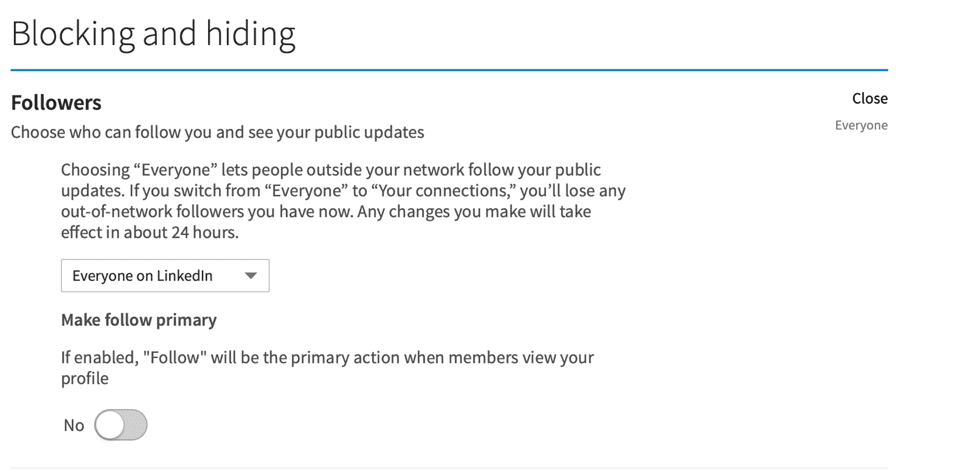
Figure 3 – Make Follow Primary
Go to Settings, Privacy and Blocking and hiding to change your setting.
#6 How to request a connection when someone has Follow as default
You can still request to connect with someone who has Follow as their default option. When you open up their profile, you can click on the ‘More’ button to the right. A drop down menu will appear with ‘Connect’.
#5 Adding people to your network via Find Nearby
When you are attending an event, such as a conference, workshop or networking event, you can turn on your Find Nearby option on your mobile device. This tool specifically encourages users to build their professional network.
How to use Find Nearby:
You can use Find Nearby only on your mobile app. Firstly you must enable Bluetooth on your phone.
Click on My Network.
Toggle the Share my Nearby Status to ‘On’.
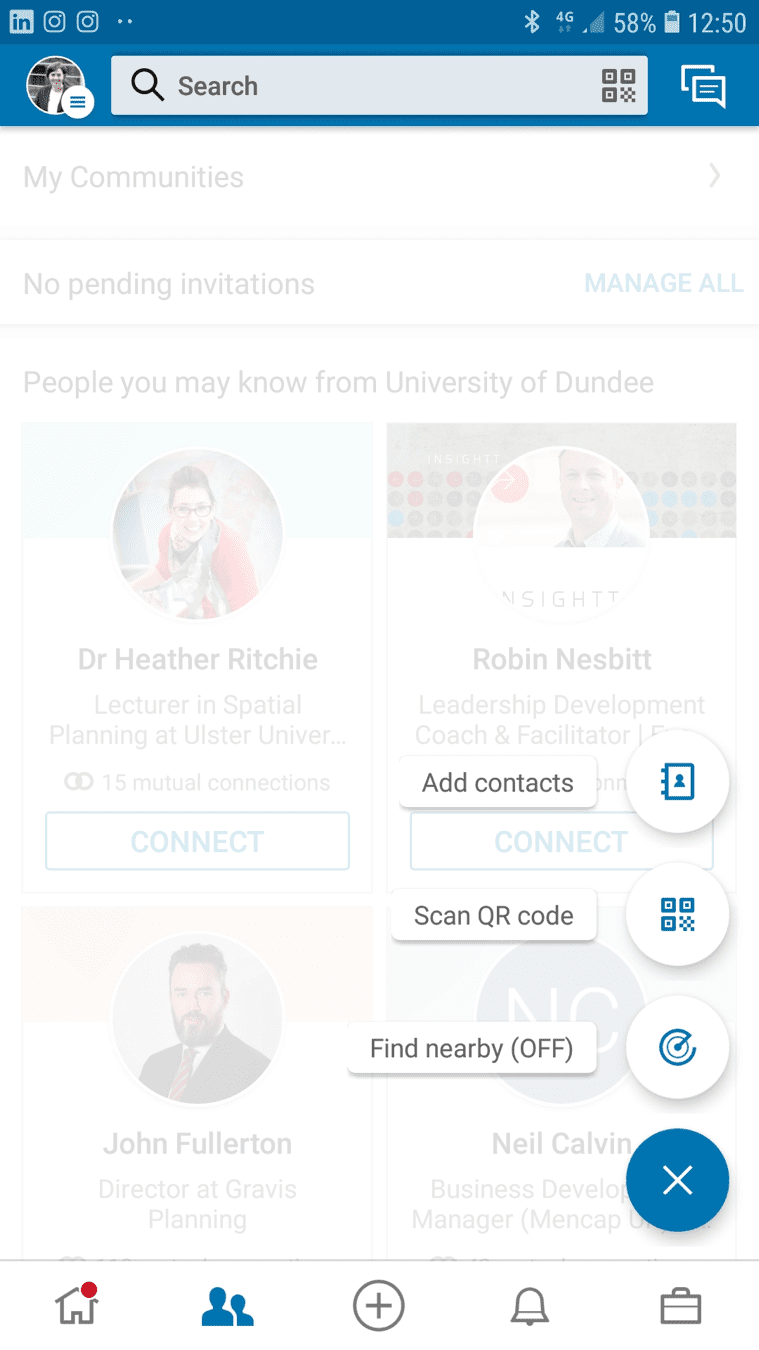
Figure 4 – Find Nearby
People who are also at the same event, who have their Find Nearby status set to ‘on’ will start to appear in the window below.
This can take a few minutes. LinkedIn recommend that Event Managers use this facility to invite attendees at the start of your event.
Your Find Nearby status will default to On until you switch it off.
There are two benefits to using this facility – you can find new connections who are at the same event as you – AND you can also see the people who are already in your network at this event, and send them a message to meet up!
When you add someone to your network using Find Nearby, you don’t have the option to send a personalised message. One tip I would recommend, is to screenshot the list of names, and send personalise invitations to those accounts later when you have the time.
Having a personalised invitation accepted means that you are opening up a one to one conversation with that connection. Otherwise the new connection is added to all of your other connections and you may forget to follow up with a message later.
#6 LinkedIn Suggested Connections
When you add new people to your network, LinkedIn will then suggest people ‘you might know’. If you want to connect with these people, the default option will be to click Connect, and you will not have the opportunity to personalise your connection request.
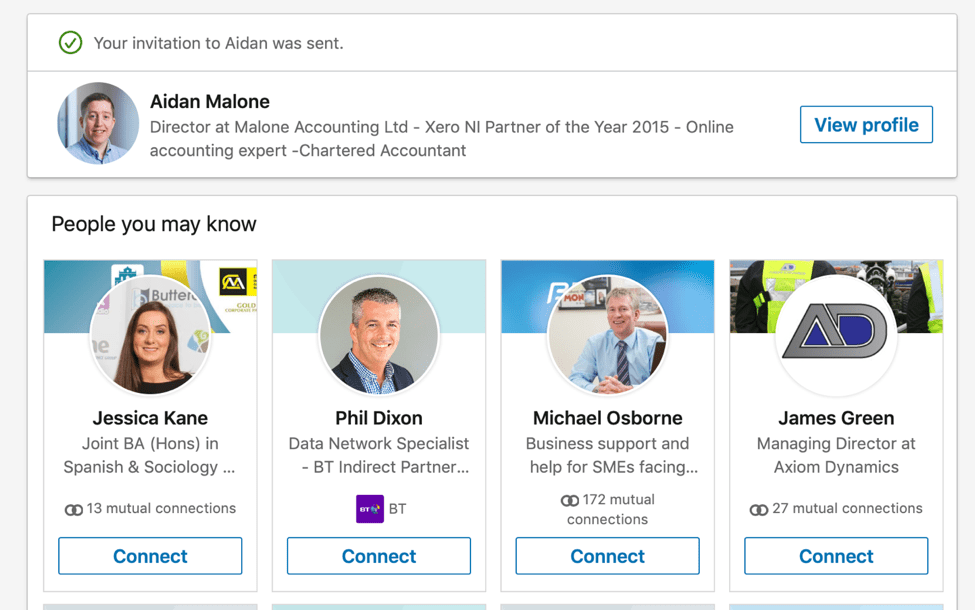
Figure 5. People You May Know
If you would prefer to send them a personalised invite, then click on the person’s profile and request the connection via their personal profile page.
The people you may know section are people who are connected to your own first connections – so it is worth having a look at the suggested people – there are usually two rows of four profiles listed.
#7 Why your headline matters
Your headline should attract your ideal client to reach out and connect with you. When you comment on someone else’s post, that persons network will see your profile, and your headline will play a major role in their decision whether or not to reach out and connect with you. If you don’t write your own headline, LinkedIn will pull the title of your current post.
#8 Why growing a valuable genuine network will actually lead to more growth in your business
If you follow some (or all) of the suggested ways to connect with people on LinkedIn above, you will start to grow a really valuable network. Sales on LinkedIn come when you have a good network and start to engage with that network.
Rather than adding everyone and anyone to your network, by limiting the number of people you add to your network you will see posts in your feed from people who are actually relevant or of interest to you.
Sales on LinkedIn works best when you go for the soft selling approach. Sharing content that helps your network, examples of how you have worked with clients, and answering questions about your field of expertise that your network may have are all good approaches to take.
#9 Restrictions on your LinkedIn requests
If you send too many requests to connect in a short time period, you may find your account is restricted in sending more connections. Also if you are sending out a lot of connection requests and they haven’t been accepted or are left pending, your account may be restricted.
How many is too many? LinkedIn are not forthcoming with this information. However, as a rule of thumb if you are planning to grow your network of genuine connections and plan to send personalised invites, this in itself will limit the number of people you can physically connect to in one day!
#10 So once you are building up your network with valuable connections, where do you go from here?
Start to engage with your network. The majority of LinkedIn users never post updates or leave comments. By starting to leave comments, you will be raising your profile. So be strategic.
When you leave comments on someone else’s post, that person’s network will see your profile photo and headline. Whose network would you like to get in front of?
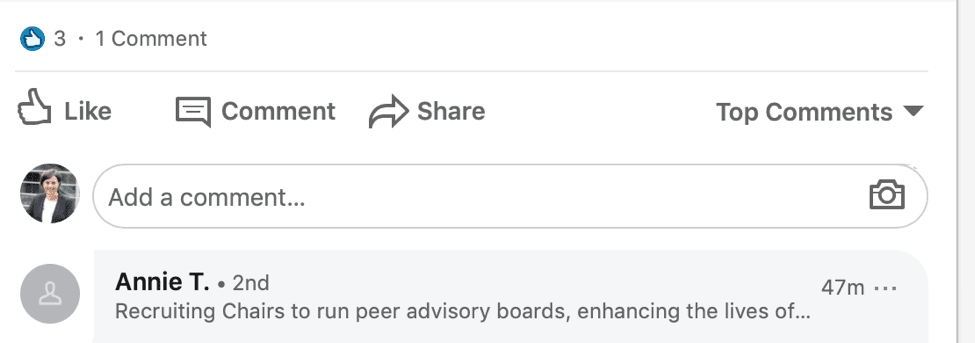
Figure 6. Finding connections through the comments on a post
If your contact (or someone in their network whose article your connection has commented on) shares a link to an article, do check what the article says before commenting. If someone else has left a similar comment that you agree with, why not reply directly to that user’s comment. This is a great way to find new contacts on LinkedIn.
#11 How to turn your network into sales
Sales on LinkedIn tend to happen in the messaging inbox or offline. You should focus on building up your network and engaging with your connections when you are spending time on LinkedIn.
Ideally you will have included a way to reach you via email or phone in your personal profile. You can click on Contact Info to find this information on other people’s profiles.

Figure 7. Contact info section

Figure 8. Contact info pop-up box
Conclusion
You can build a great genuine network on LinkedIn that will raise your profile and lead to sales in your business. The key is to choose your connections strategically, and once you have connected with someone, to actively post updates, leave comments and always remember the ‘Social’ part of using Social Media.
www.linkedin.com/in/louisebrogan
Your business can take full advantage of the new powerful features and Louise Brogan – Northern Ireland’s LinkedIn trainer – can show you how at this LinkedIn for Business Masterclass Belfast with Louise Brogan.